
Watch mode
Toggle Watch in the status bar (or ⌘⇧W / Ctrl+Shift+W) to enable the passive monitor — a separate subsystem that quietly observes your terminal and browser activity and surfaces brief, dismissible advice: a missed step, forgotten cleanup, a scope concern.
It only advises — it never acts. The watcher has no tools of its own; it can't run commands, edit files, or operate the browser. It just watches and offers a note when one is useful.
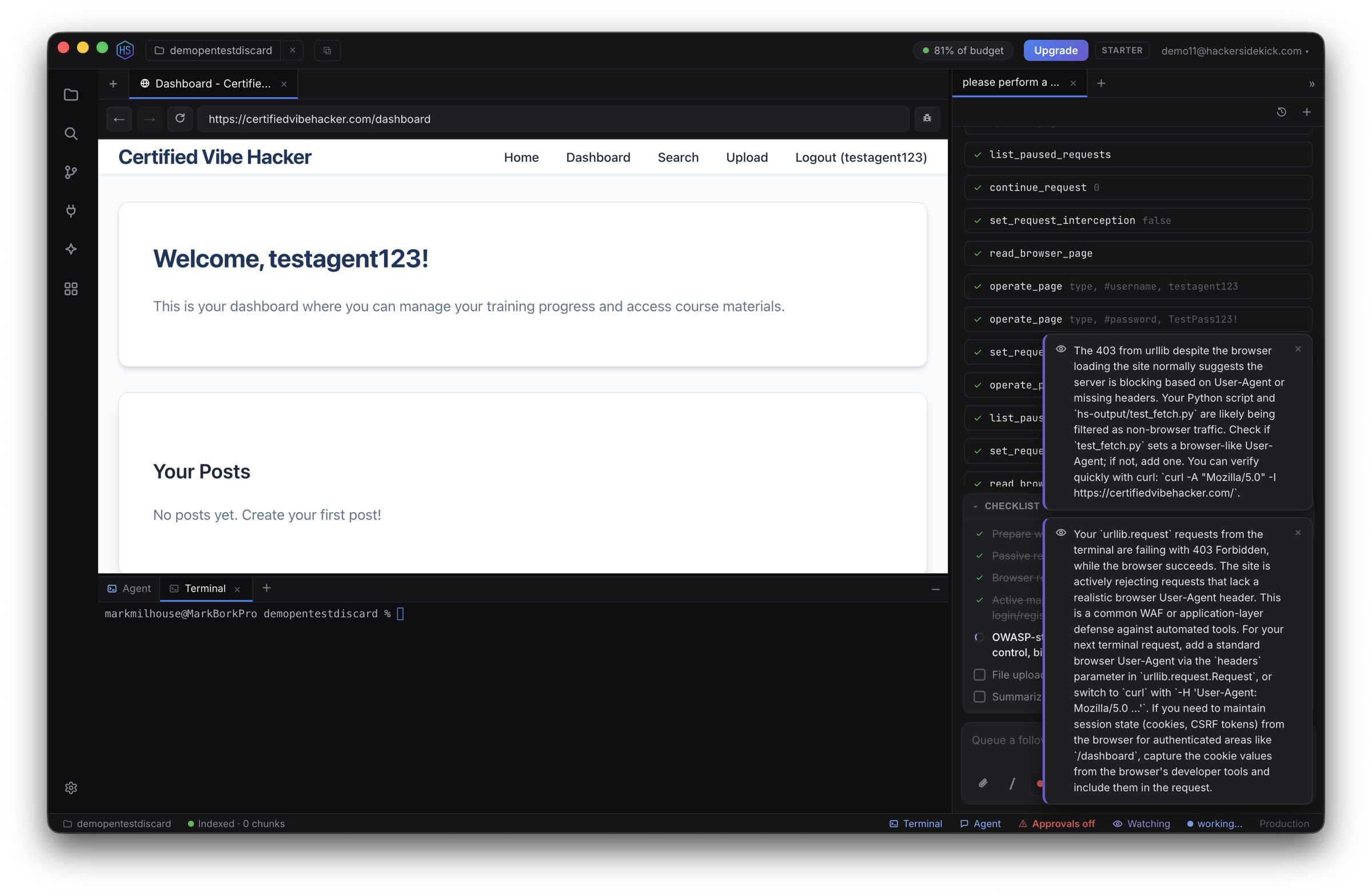
Ask it directly
Two shortcuts put the watcher to work on whatever you're focused on right now — the open file, the terminal's recent output, or the current browser page:
| Action | macOS | Windows / Linux |
|---|---|---|
| Explain what I'm looking at | ⌘⇧E | Ctrl+Shift+E |
| Ask the watcher a question | ⌘⇧A | Ctrl+Shift+A |
| Toggle Watch mode | ⌘⇧W | Ctrl+Shift+W |
Advisories are dismissible and never block your work.
See also
- The agent & chat — the primary agent that does act
- Keyboard shortcuts